
I built two Claude Code mods in eight minutes. Here’s what they do.
I wanted two small things from Claude Code that it didn’t do. So I asked it to build them. Eight minutes later, both were running.
Claude Code now supports mods: small plugins that hook into the app itself. They can draw a row above the prompt, open a side pane, add a slash command or react to every tool call. You describe what you want, Claude writes the plugin, and it hot-reloads in the session you’re in. No restart.
These are the two I built, with the prompts I used and the code that came out.
Mod 1: a usage row above the prompt
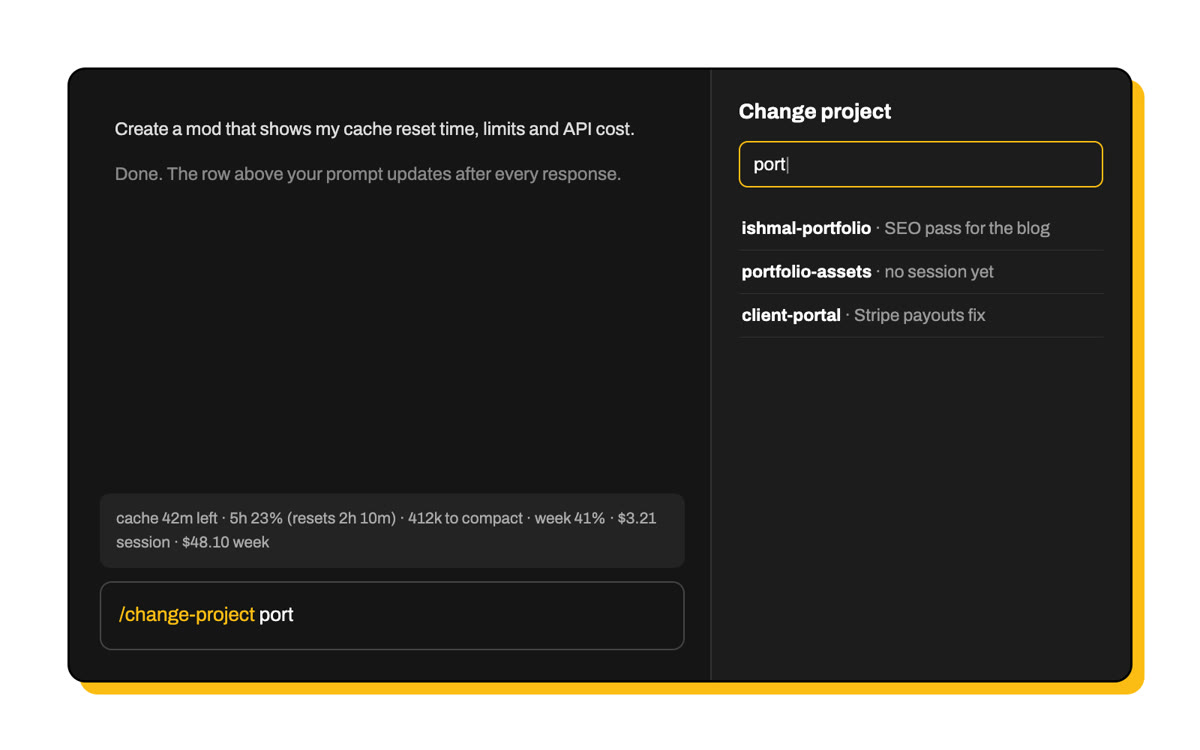
I kept losing track of four things: how long until the prompt cache expires, how much of my limits I’ve used, what the session would have cost on the API, and how close I am to auto-compact. So:
Create a mod that shows my active cache reset time, my session token usage, my weekly limit usage, and the API cost of the current session and of the week.
A few minutes later, this sat above my prompt:
The first version showed total tokens used. I realised that number didn’t help me decide anything, so I changed it:
Change the token usage to show how many tokens are left until compact.
Most of the work is two hooks. One listens for usage updates from the session. The other draws the row:
on('session.measure', async ($, e, next) => {
  // rate limits (five_hour, seven_day, with reset times) and the session's cost
  await measure($, e.rateLimits, e.cost)
  return next(e)
})

on('ui.render', { component: 'AbovePrompt' }, async ($, e, next) => {
  const { Box, Text } = $.ui.resolve(e)
  return <Box><Text dimColor>{parts.join('  ·  ')}</Text></Box>
})
Tokens left until compact come from $.session.usage(), which reports the auto-compact threshold next to how full the context window is. The weekly cost is the one figure the app doesn’t give you, so the mod keeps a small ledger of each session’s cost and adds up the current week.
Mod 2: /change-project
I work across a lot of client repos. Switching meant hunting through the sidebar for the right session. I wanted to just type the folder name:
Create a mod that lets me type a command like /change-project {directory name}. It should open the most recent session for that directory, or create a new session if there isn’t one. While I type the directory name, it should show a search bar or autocomplete suggestions.
Now /change-project ring opens my most recent session in that folder. If more than one folder matches, a search pane opens with the matches, newest session first, and filters as I type.
await $.command.register({
  name: 'change-project',
  description: 'Open the most recent session for a project folder',
  argumentHint: '[folder name]',
})

on('command.run', { command: 'change-project' }, async ($, e) => {
  const match = rank(await projects($), e.args)[0]
  await $.process.run(['open', match.session.link]) // the app’s own session link
  return { text: `Opened “${match.session.title}”` }
})
The folder list comes from my desktop sessions, plus every folder two levels inside ~/Development.
Where it hit the limits
Two parts didn’t work out exactly as I asked, and Claude said so instead of faking them:
- A mod can’t start a new session in another folder. So for a folder with no session yet, the pane offers to move the current session there instead.
- Autocomplete while typing depends on the app passing keystrokes to mods. The search pane is the reliable route.
Turning them on everywhere
Mods built in a session only load in that session. I wanted these in every one:
I want both mods, and all future ones, enabled in every session.
Claude moved them to ~/.claude/mods and listed each folder in the env block of ~/.claude/settings.json. Every new session, in the desktop app or the terminal, loads them from there:
"env": {
  "CLAUDE_CODE_PLUGIN_DIRS": "~/.claude/mods/usage-band:~/.claude/mods/change-project"
}
Why this is worth eight minutes
The tool I use all day now fits the way I work, and I didn’t write a line of it. If something in your setup annoys you every day, describe it to Claude Code and ask for a mod. Start small: one row, one command.
Want the full code for either mod? Email me and I’ll send it over. For a bigger build, read how I rebuilt this portfolio with Claude Code in three hours.